Your best people are stuck on the paperwork, not the build.
Your estimator, PM, and contract administrator are buried in the paper trail — RFIs, tender packs, variations, and progress claims — while the one drawing that matters sits in someone else’s inbox. RMAI builds grounded, auditable tools on your own project records so that trail is drafted, cross-checked, and cited in minutes — and a named person still signs the contractual call.
How the sign-off and your data are handled.
What actually slows an Australian builder down.
It is rarely the trade work. It is the trail behind it — the RFI sitting unanswered for ten days, the variation you under-claimed because the instruction was a text buried in someone’s phone, the tender pack read at midnight, the crew that poured to a superseded drawing. Every one of these is your scarcest senior people doing detective work across eleven disconnected systems, in a market where you can’t hire the help to do it for them.
No one can tell you which drawing is the truth
Your project lives across email, spreadsheets, a shared drive, the accounting package, a project platform, and field apps — the median Asia-Pacific builder juggles 11 separate data environments with no governed source of truth. Your people burn hours asking which revision is current. Deloitte found moving to one uniform data environment would hand a construction leader back about 10.5 hours a week.
Crews keep building from superseded drawings
When the current spec or instruction is not reliably in front of the right person on site, teams build from the wrong information and tear it out again. Miscommunication and poor project data drive almost half of all rework — and rework eats 5–10% of total project cost. On a $5M job that is $250k–$500k of margin built and demolished.
RFIs sit for ten days and stall the program
The median construction RFI takes 9.7 days to resolve and costs about US$1,080 to review and answer — and nearly 22% never get a response at all. Every open RFI is a crew working around a question or downing tools, while your PM plays detective across drawings and specs to draft the answer.
You can't recruit your way out of the admin
In an April 2024 Master Builders survey, 85% of builders said it is a struggle to find suitably qualified workers and 66% named sourcing workers as the industry's single biggest problem — with the sector forecast to need 130,000 more workers. When you cannot replace a skilled estimator, every hour they lose to re-keying and file-hunting is an hour you cannot buy back at any price.
What changes once the tools read your own project records.
Builders working with RMAI get their estimators and contract administrators back — and a tighter audit trail at the same time, because every draft cites the drawing, clause, or instruction it came from. The figures below are illustrative of shipped patterns. Nothing finalises a contractual position, a Security of Payment claim, or an RFI on its own; a named person always makes the call before it is issued.
The questions leaders ask first.
The questions below are the ones RMAI hears in the first call — on safety, staffing, compliance, cost, and feasibility.
What the time recovered is worth.
Move the sliders for your own volumes; the benchmark shows where shipped builds have landed.
| Task | Before | After |
|---|---|---|
| RFI triage + first-pass draft | ~9.7 day median, ~US$1,080 each | sourced draft in minutes (PM reviews) |
| Find the current spec clause / drawing | interrupt whoever last touched it | < 1 min, quoted and linked |
| Tender / RFT compliance review | hours per pack, blank-page start | clause-by-clause matrix in minutes |
| Variation + progress-claim pack | hand-assembled late from scattered files | evidence-linked draft, checked before submission |
What RMAI has built for this sector.
The applications below are grounded, human-in-the-loop tools for this sector — some already built and shipped, some scoped from real briefs. Ask us which is which.
Variation Claim Builder

Turns the scattered trail behind a variation — the email, the site diary note, the photo, the text, the sub's invoice — into a dated, evidence-linked claim with a costed build-up, ready for a person to check and approve.
Tender Compliance Matrix Builder

Turns a document-heavy tender pack into a clause-by-clause compliance matrix — requirement, source clause and page, owner, evidence required, and the risk if it is missed — so the bid/no-bid call is made with the whole picture, not a partial read under deadline.
RFI Triage Desk

Reads each incoming RFI, finds the relevant spec and drawing, drafts a first-pass answer with source links, flags duplicates and overdue items, and routes it to the right person — who reviews and approves before anything goes back.
Quote from Architectural Plans

Reads architectural drawings, takes off the quantities — floor areas, wall lengths, window and door schedules — prices them against your rate card, and drafts a quote for the estimator to check against the plans and approve before submission.
Project Knowledge Assistant

Ask a question and get the answer straight from the firm's own specs, head contract, ITPs, and standards — with the source passage, a link, and a confidence flag — instead of interrupting whoever last touched the file.
Photo to Progress Report

Identifies the trade work in a batch of site photos, maps each to its line in the progress claim, assigns a completion percentage, and drafts the report with the photos attached — for the site manager to adjust the calls and sign off.
Mobilisation Pack Drafter
Reads the sales handoff on a won job, splits it into one job card per crew leg — scope, treatment, spec, quantities, site constraints — and lays the pack out for the works manager to check and approve before any crew is booked.
Timesheet-to-Payroll Reconciler

Pulls approved hours into the pay run and flags overtime spikes, missing breaks and absent clock-offs for review — turning a two-day reconcile into an hour.
Supplier-Invoice Reconciler

Matches each supplier invoice against its purchase order and goods-receipt note, flags price variances, quantity mismatches, and missing credits, and routes the exceptions for a person to clear — never posting to the ledger itself.
Shop-Floor SOP Copilot

Answers shop-floor SOP, machine-setup and troubleshooting questions from your own approved manuals, work instructions and fault history — citing the source document and section on every step, and refusing when the documents don't cover it, so new starters stop queueing for the one veteran fitter.
Scope & Billing Guardian

Reviews each draft invoice against the engagement letter scope and agreed rate card before it goes out — flagging out-of-scope work, rate variances and non-billable time, and drafting the adjustment note for the engagement owner to clear.
RFQ-to-Quote Copilot

Parses an incoming RFQ — email, web form or PDF — into materials, quantities and specs, checks them against your bill-of-materials and lead times, and drafts a structured quote, flagging spec gaps for the estimator to resolve before it reaches the customer.
Quote Drafter

Turn an inbound request for quote into a priced first-pass draft in minutes, built from your own prior quotes and house pricing rules.
Quote from Engineering Drawings
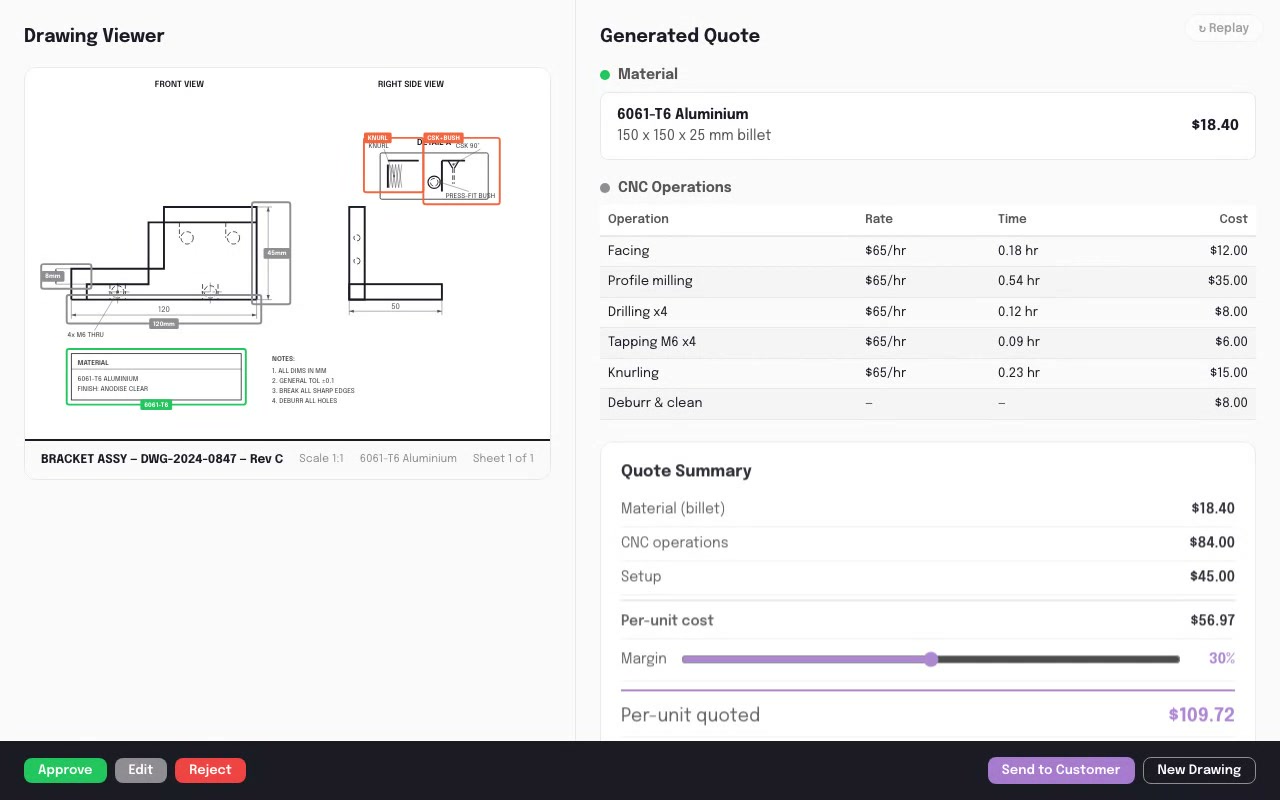
Extracts dimensions, tolerances, materials and operations from engineering drawings, prices them against the workshop's rate card, and drafts a quote — so the estimator checks the takeoff against the drawing and approves before it goes out.
Precedent & Knowledge Finder
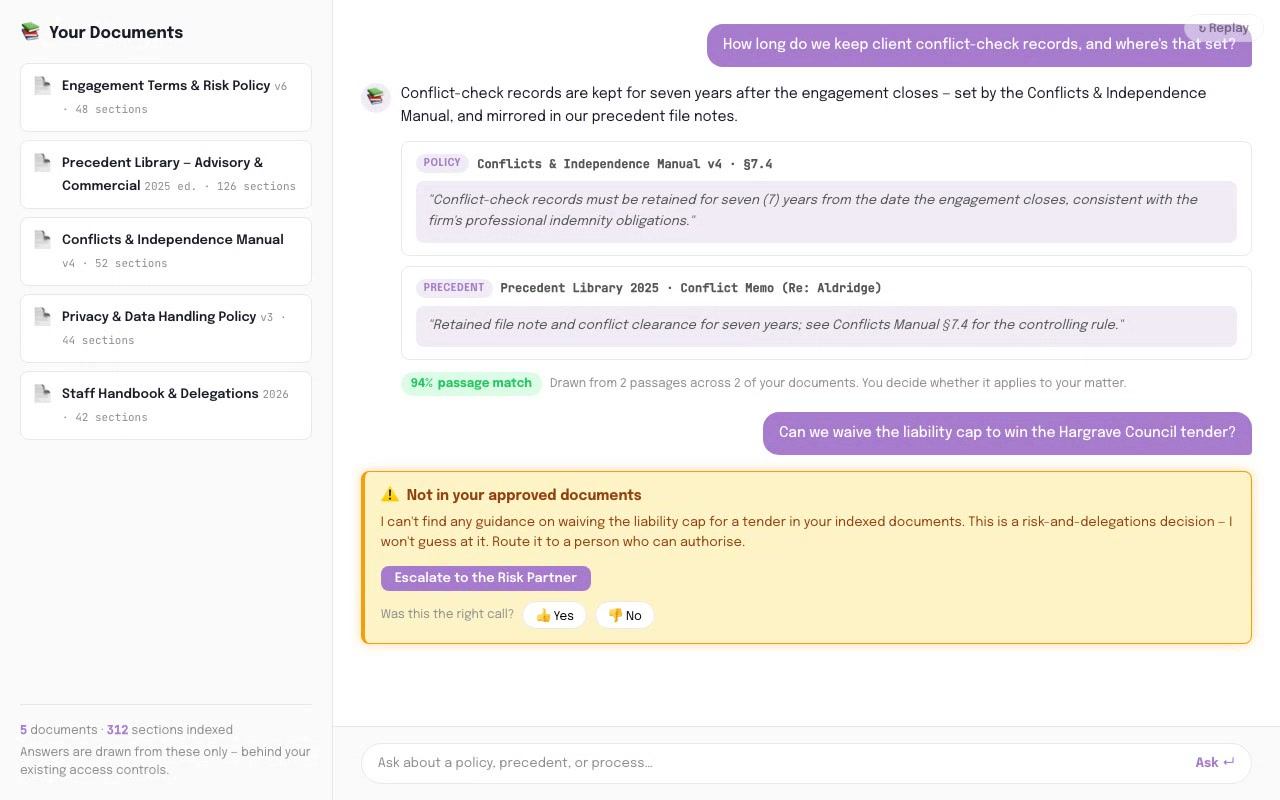
A fee-earner asks a question in plain language and gets the answer from your own precedents, advice, policies and matter files — with the exact document, version and clause quoted, and an honest "not on file" when it isn't there.
Contract Clause Review

First-pass triage of an inbound contract against your firm's playbook — every clause classified, the risky ones flagged with a suggested redline, before a lawyer opens the document.
Software that connects to AI
Find the integration path for Construction software.
Compare provider APIs, read/write access, MCP support, and practical integration difficulty.
Prompts you can use today, for free.
Sector-specific prompts RMAI uses as starting points. Copy one and run it against de-identified samples — or inside an approved private environment — to see the shape of the answer before you talk to us.
How RMAI would work with you.
Every engagement starts with the diagnostic and scales from there. These link through to how RMAI works.
What a defensible result looks like.
These are published third-party results from comparable construction operators — illustrative of the target RMAI builds toward, with a human in the loop throughout. They are not RMAI client claims. Most are vendor-reported, and Australian AI-outcome evidence is thinner than the US/global examples, so treat the headline figures as directional.
Buried in RFIs, tenders, and claims? Let's pick one to fix.
The two-week diagnostic is the right place to start. Fixed scope, fixed price. We’ll tell you whether the pattern fits and what the build would look like.